ucsd-compfab2
Exercise 1: Laser Cut Stencil

Description
Using Grasshopper to control the 2D drawing commands in Rhinoceros (lines, curves, etc.), Design a parametric stencil that fits on a 3x5” business card. Parametric in that sliders (or random numbers) should control the values of parameters that determine the design. (Part 1)
When you have finalized the design, you will cut this out using the laser cutter in DIB or Envision, and you can use them as actual stencils to label your stuff. (Part 2)
Requirements
- Using Grasshopper, implement a parametric stencil.
- Include an outline (approximately 3 x 5”, exact dimensions set with sliders)
- Inclue your name and some text (set with text box entry)
- Develop a personal logo or some graphics.
- Use red lines for anywhere you want the laser to cut.
- Use blue lines for anywhere you want it to etch.
Template
05_rect_point_text.gh demonstrates sliders to establish a location and size for a rectangle, sliders to establish a point and rotation for text, python code to extract curves from text, and sliders to create a circle of circles.
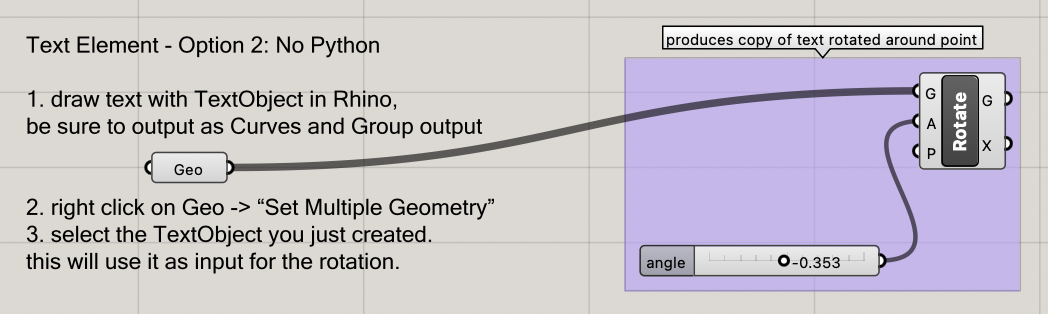
NOTE: The python code is too complicated/out-of-scope for week 1, feel free to just add text as TextObject in rhino not Grasshopper, and use GH for the other graphic elements. (see below for an example of how to get geometry from rhino into grasshopper)
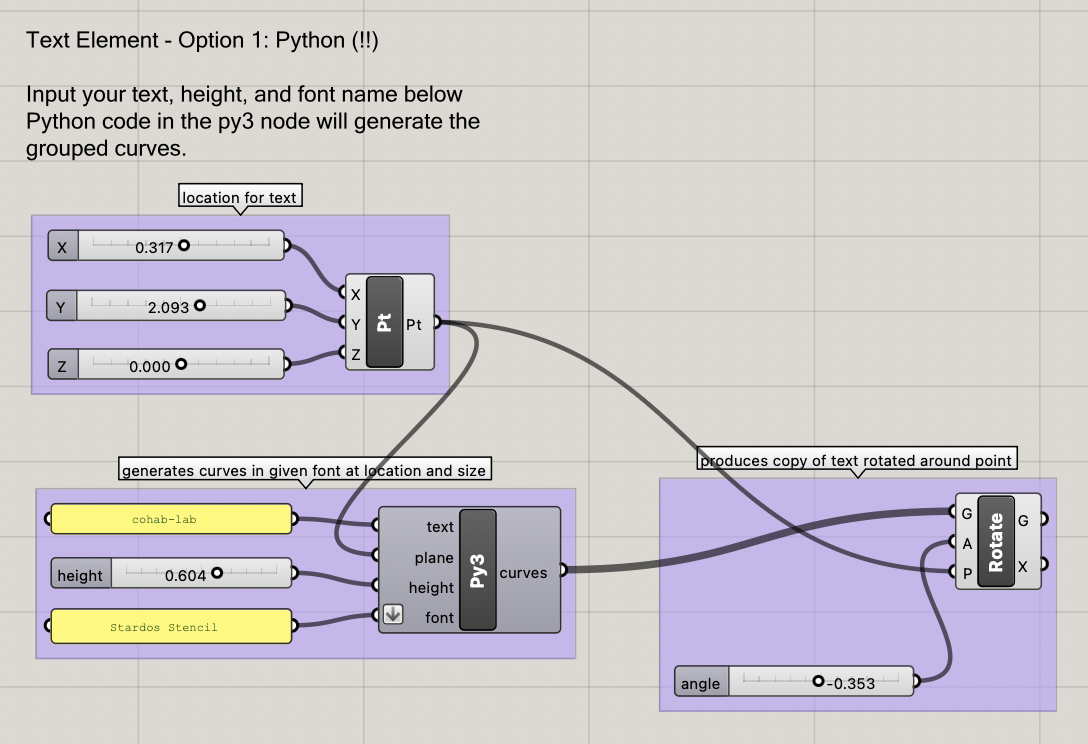
I have added a second option where you draw the text curves with TextObject, then right click Set Multiple on the Geo node in GH, select it in Rhino, and your script will rotate the existing geometry (instead of using the python code).
Part 1 Submission
- Export your image as an SVG.
- Submit your Grasshopper (.gh) file and SVG to Canvas
- use the naming convention lastname_hw1.svg and lastname_hw2.gh for the files.
Part 2 Fabricate
- Complete the Envision responsibility contract and laser cutter training.
- Cut your design out of thick card stock (I have this), cardboard, or thin wood.
- Photograph your fabricated stencil.
- Bring it to the next class.
Part 2 Submission
- Add images to your Digital Sketchbook documenting this process:
- images of the vector design in Rhino
- photos of laser cutting process (if you want to)
- photos of the finished part
- Submit a pdf of those pages from the sketchbook showing this assignment.
- DUE by 9:30am, 10/6 (Tuesday) to Canvas https://canvas.ucsd.edu/courses/78907/assignments/1207532
References
- Rhino has some great video tutorials to help you getting started.
- Rhino Learn (tutorials)
- You can also watch through this video tutorial of Rhino basics: compfab_2d_basics.mp4