ucsd-creative-robotics
Sensors with the Dev Board
[TK]
Switch
Bump/contact sensor [TK]
Photoresistor
Light sensor
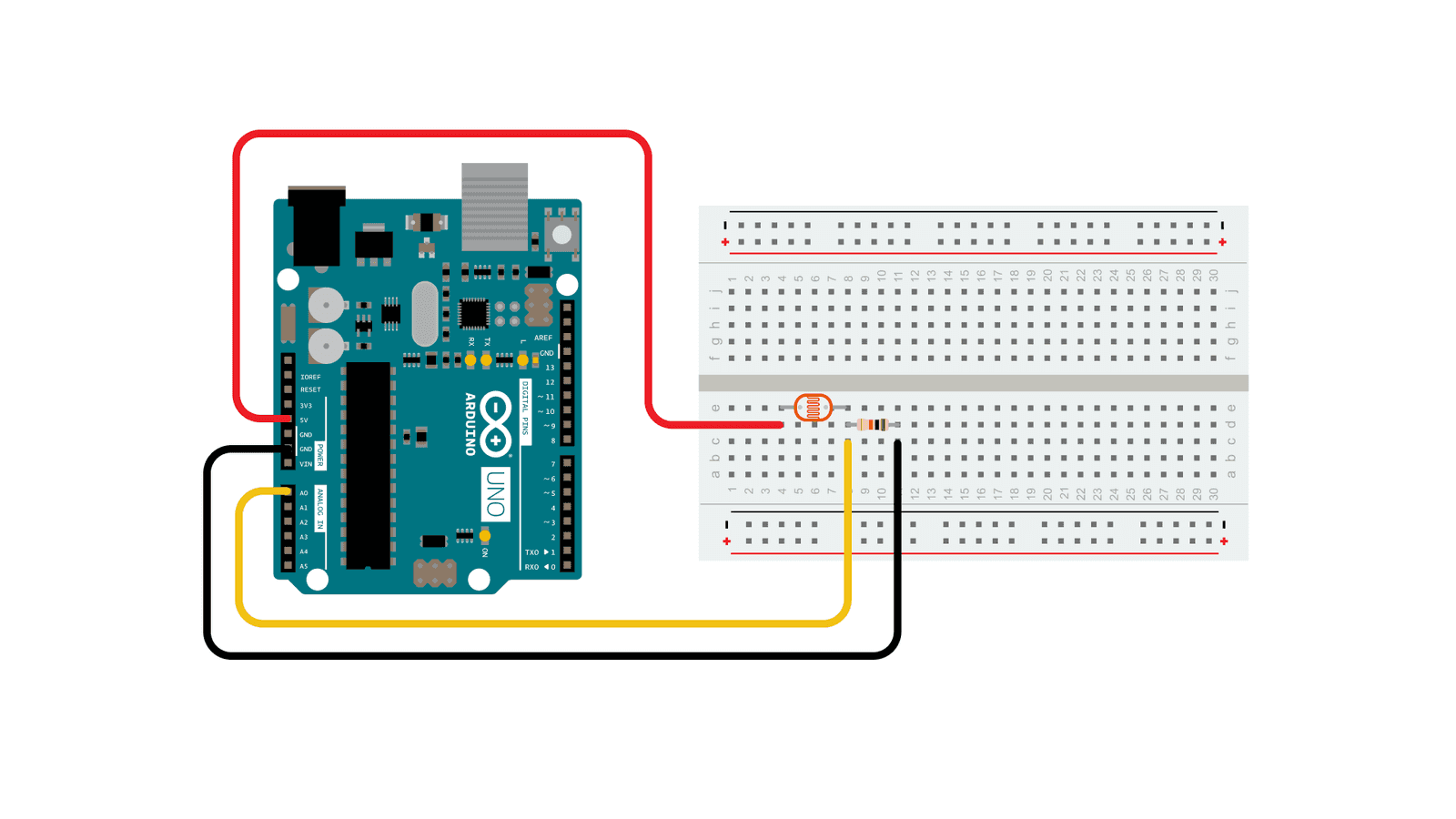
https://www.arduino.cc/en/Tutorial/BuiltInExamples/AnalogInput
- Use a multimeter to see how the resistance changes with the photoresistor.
- (this does not need a circuit. connect the red lead to one side of the photoresister, and the black lead to the other)
- We can put a photoresistor in series with a resistor to make a voltage divider. This is similar to how a potentiometer works. As the resistance of the photoresistor changes (the light changes), the output voltage will change.
- Hook up the circuit in the picture above with a resistor, photoresistor, and wires to ground, 5V, and A0.
- Use AnalogReadSerial from the section above, and use the serial port monitor to see what the range of output voltages is.
- Activity: Use the photoresistor to control the servo from last class, in place of the potentiometer
- Use the serial port to debug the range of analog values coming in from the photo-resistor/resistor voltage divider.
Ultrasonic Rangefinder

- Install the HCSR04 library (Tools->Manage Libraries->Search for “HCSR04”)
- Try the File->Examples->HCSR04->simple example.

NOTE❗❗: Change the line that initializes the sensor to use pins 12 and 11 from:
UltraSonicDistanceSensor distanceSensor(13, 12); // Initialize sensor that uses digital pins 13 and 12.
to
UltraSonicDistanceSensor distanceSensor(12, 11); // Initialize sensor that uses digital pins 12 and 11.
(shown in the diagram above)
HC SR04 Timing Diagram 

Infra-red (IR) Rangefinder
[TK]
Capacitive Touch Sensing
[TK]
Thermistors

- Good adafruit tutorial: https://learn.adafruit.com/thermistor/using-a-thermistor
- including more about voltage dividers: https://learn.adafruit.com/thermistor/using-a-thermistor#analog-voltage-reading-method-2917724
- Demo: How a thermistor changes resistance with changes in temperature
Temperature and Humidity
1) Install DHT11 Library: Tools -> Manage Libraries -> search for DHT11 by Dhruba Saha.
-
 2) Try Examples -> DHT11 -> Read Temperature
3) Wire up circuit (confirm Elegoo DHT11 pinouts before powering on, DATA/OUT should go to Arduino D2)
2) Try Examples -> DHT11 -> Read Temperature
3) Wire up circuit (confirm Elegoo DHT11 pinouts before powering on, DATA/OUT should go to Arduino D2) -

DHT11 Protocol  from (https://www.ocfreaks.com/basics-interfacing-dht11-dht22-humidity-temperature-sensor-mcu/)
Temperature Sensor
NOT IN ELEGOO KIT

(image from Adafruit)
- The TMP 36GZ is a temperature sensor.
- This is an active sensor, meaning we provide power to ground and 5V, and it outputs a voltage proportional to temperature.
- Looking at the datasheet, we see it is 10mV/degree Celsius. That means we can use the output voltage (read by analog in) to figure out what the temperature is.
- To convert from AnalogRead value to milli-volts: Voltage at pin in milliVolts = (reading from ADC) * (5000/1024)
- To convert from milliVolts to degree celsius: Centigrade temperature = [(analog voltage in mV) - 500] / 10
- Activity:
- Use AnalogReadSerial to figure out what the current temperature in the room is in Celsius.
- Modify your code to convert Celsius to fahrenheit.
- Explore the dynamic behavior: how quickly does it change in response to breathing on it? In response to touching it? Can you get the temperature to go up, or go down?
Capacitive Touch Sensing
[TK]
References
[TK]